 Meter Burn
Coach in your pocket, workout on your wrist.
Meter Burn does what a personal trainer does with a spreadsheet: holds your programs, reads your log, and proposes the next step — yours to accept or decline. Build on the phone, train from the watch, phone in the locker. No account, nothing to buy, nothing in the way.
Free on the App Store · iPhone, iPad and Apple Watch · requires iOS 26.1 and watchOS 10

The stage
Know where you are without reading anything.
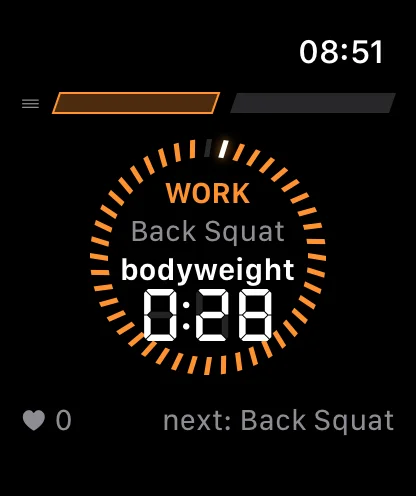
Rests and timed work burn down on a ring of tick cells around seven-segment digits. One revolution is the whole step, and a rest runs hot as it empties — so a glance tells you what a number would have had to be read.
Prescriptions stay on screen, your live heart rate and effort are metered through Apple Health, and the footer names the work coming up with its load — so the bar is loaded before the timer runs out.
More about the stage


The studio
Build the training. Then stop thinking about it.
Build workouts from straight sets, circuits and Intervals, then arrange them into a rotating program with an optional weekly schedule. Home shows what is next without you going to look for it.
Your training week reads as a meter — a cell per day, banked where you trained and owed where you fell behind. It states where you are, and leaves what to do about it to you.
More about the studioProgression
It proposes. You decide.
When your log says an exercise is ready, Meter Burn proposes the next step — more load, or more reps at the top of the range. Ready is earned, not counted: beat a target of 10 with an 11 two workouts running and it proposes the move; log that same 11 at RPE 9.5 and it holds, because a grinding rep is not a baseline. Every load control steps along the ladder you declared for that exercise: your increment, your floor, your ceiling.
Accept a proposal and it becomes the prescription for next time. Decline it and the app stays quiet. Cut the same rest three workouts running and it offers to shorten the prescription — an offer, not an edit.
Nothing changes unless you agree.How progression works
Body composition
It says what the readings support, and no more.
Turn it on and Home gains a Body card: mass, fat mass and lean mass drawn as two bands on one kilogram axis, with your workouts overlaid on the same dates — each sized by the energy Apple Health recorded, or drawn as an open ring where it recorded none.
It refuses to state a change the readings cannot support, and says plainly when there are too few weigh-ins, when they sit too far apart, or when the most recent one is too old. Off by default, display only, and never written back to Apple Health.
What the Body card does and does not claim
Why it exists
What his trainer did with spreadsheets.
Meter Burn’s author is not a trainer. He trained with one for years, and kept what most apps have no place for: the systems he was taught, and a spreadsheet’s worth of data about what actually happened, workout by workout. When he wanted to get back into training, every app he tried put something between him and it — an account, a subscription, a stranger’s plan, a feed.
So he built the one that does what his trainer did with those spreadsheets — write the program, log the work, move a number when the log has earned it — connected to what Apple Health already knows about the effort. The grammar underneath was tested against all 248 workouts of his training library before the first screen existed, and held every one. There is nothing to buy, nothing to sign up for, and no feature that is not about the training.
Your history, your devices, nobody else’s.
There is no account and nothing to sign up for. Your training history stays in step across iPhone, iPad and Apple Watch through your own private iCloud, and every completed workout is saved to Apple Health. Anything read back from Apple Health is only ever displayed, never stored.
No analytics. No tracking. No advertising. No third-party SDKs. Your training data never reaches Avant Media or anyone else, because there is no path by which it could.
Read the privacy policyCoach yourself, properly.
Meter Burn is built and published by Avant Media, a one-engineer software studio. The engineer is the athlete, and the app is how he trains.
Get Meter BurnFree on the App Store · iPhone, iPad and Apple Watch · requires iOS 26.1 and watchOS 10